
Shipping Manager for WooCommerce – Custom Cities, Rates & Shipping Zones
Control WooCommerce city selection, shipping rates, custom cities and shipping zones. Create a more focused checkout for stores that need detailed local delivery control.
- Unlimited Custom Cities
- Shipping Rates & Costs per City
- Custom City Field Label
- Billing or Shipping Fields Rate Calculation
- City Dropdown & Autocomplete
- Custom Shipping Zones by Country
- Disable Billing & Shipping Fields
- Assign Country to Custom Cities
LIMITED OFFER 30% OFF
30-day money-back guarantee (Refund Policy)
Why WooCommerce Shipping Is Not Always Enough for Local Delivery
WooCommerce provides standard location and shipping settings, but they do not provide detailed city-level control for every local delivery area.
Shipping Manager adds custom cities, city-based shipping rates and custom WooCommerce shipping zones so you can organize shipping around the locations your store actually serves.
Key Features
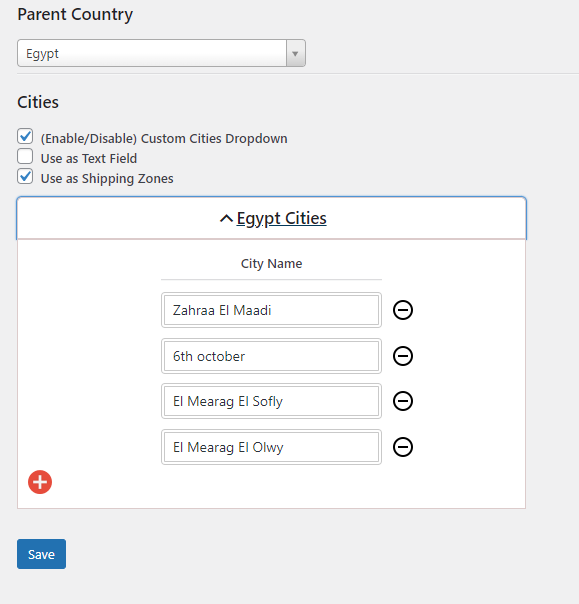
Unlimited Custom Cities
Add the cities and delivery areas supported by your store.
City Dropdown
Convert the WooCommerce checkout city field into a controlled dropdown.
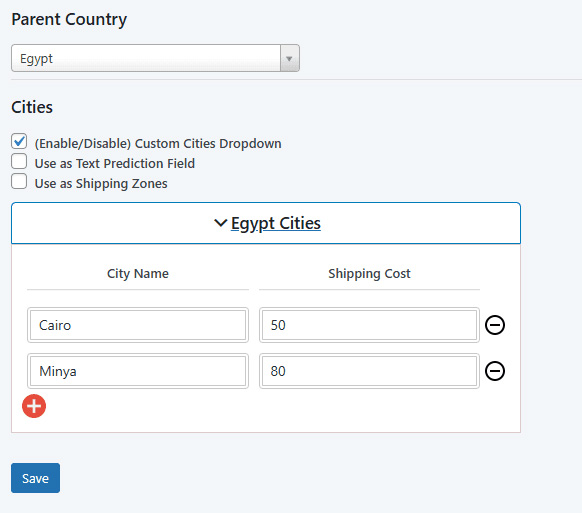
Shipping Rates per City
Set specific shipping rates and costs for your custom cities.
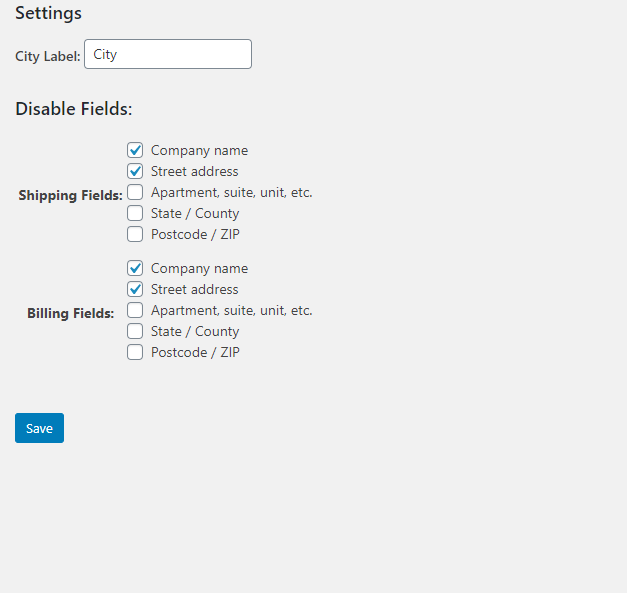
Custom City Field Label
Customize the city field label shown during checkout.
Custom Dropdown Cities
Control the city options available to customers at checkout.
Parent Country
Assign a parent country to your custom cities.
City Autocomplete
Convert the checkout city dropdown into a text field with autocomplete.
Disable Shipping Fields
Hide unnecessary shipping fields from the checkout.
Disable Billing Fields
Hide unnecessary billing fields from the checkout.
Why Use Shipping Manager for WooCommerce?
Shipping Manager gives WooCommerce stores more control over local shipping locations without forcing customers to manually enter every city.
You can manage custom cities, city dropdowns, city autocomplete, shipping rates, custom shipping zones and checkout fields from one WooCommerce shipping solution.
Add the Cities Your Store Actually Serves
Add unlimited custom cities to create a controlled list of locations supported by your WooCommerce store.
Each custom city can be associated with its parent country and used with your shipping configuration.
Convert the WooCommerce City Field into a Dropdown
Turn the standard checkout city text field into a dropdown containing your custom cities.
This gives customers a clear list of supported locations instead of requiring them to manually enter the city name.
Set Shipping Rates and Costs for Each City
Create Custom WooCommerce Shipping Zones
Choose the Address Used for Shipping Rate Calculation
Choose whether shipping rate calculation should use the billing fields or shipping fields.
This lets you match shipping calculation with the way your checkout collects customer location information.
Use City Autocomplete Instead of a Dropdown
Simplify the WooCommerce Checkout
Who Is Shipping Manager for WooCommerce For?
Local Delivery Stores
Manage specific cities and delivery areas with custom shipping rates.
Regional WooCommerce Stores
Control the locations your store serves and organize shipping by city, state and country.
Courier-Based Businesses
Set different shipping costs when delivery charges vary between cities.
Food & Grocery Stores
Give customers a controlled list of supported delivery locations.
Stores with Many Local Areas
Use city autocomplete when a long dropdown list would make city selection slower.
Stores Needing a Cleaner Checkout
Hide unnecessary billing and shipping fields and customize checkout labels.
Shipping Manager for WooCommerce Features
- Unlimited Custom Cities – Add as many custom city options as your store needs.
- City Dropdown – Convert the WooCommerce checkout city field into a dropdown.
- City Autocomplete – Convert the checkout city dropdown into a text field with autocomplete for faster city selection.
- Shipping Rates per City – Set specific shipping rates and costs for each custom city.
- Custom Shipping Zones – Create shipping zones using city, state and country.
- Custom City Field Label – Customize the checkout city field label.
- Custom Dropdown Cities – Control the available city options.
- Parent Country – Assign a parent country to custom cities.
- Disable Billing Fields – Hide unnecessary billing fields.
- Disable Shipping Fields – Hide unnecessary shipping fields.
- Flexible Rate Calculation – Choose billing or shipping fields for shipping rate calculation.
Take Control of WooCommerce Shipping
Frequently Asked Questions
Can I add unlimited custom cities?
Can I set different shipping rates for different cities?
Can I create WooCommerce shipping zones based on cities?
Can I use city autocomplete instead of a dropdown?
Can I hide unnecessary checkout fields?
Can shipping rates use billing or shipping information?
 Screenshots
 Screenshots
Related products
- Sale!

Freemius Checkout Button for Elementor – Sell Licenses Easily
$54.00Original price was: $54.00.$19.99Current price is: $19.99. -
Bulk Wholesale Dynamic Pricing Buttons for WooCommerce
$23.00 -
WPSAAD Addons For Dokan And Elementor
$29.99 - Sale!
WordPress Image Alt Text Manager Bulk & Dynamic + AI (images SEO Optimization)
$83.88Original price was: $83.88.$57.99Current price is: $57.99.